Showing posts with label iPod. Show all posts

10/15/12

Best Apps 2012: This year's hottest apps


want to know the best iPhone apps to download in 2012? What about the free Android apps to get you through the next twelve months? T3 has got your app life covered...
To help you in the quest to load up your smartphone with the best time-killers and apps to make the most of the year ahead, we’ve handpicked apps across the platforms that warrant your immediate attention.
So whether you’re an Apple iPhone 4S user, a Google Android lover, aBlackBerry fiend, or a Windows Phone 7 newbie,  switch on your Wi-Fi or 3G to download our selection of this month’s hottest apps.
Remember you can check out the latest iPhone, iPad, Android, Windows Phone 7 and BlackBerry apps rated and all in one place in the T3 App Chart.


Stay.com

Avoid costly overseas roaming charges with offline maps and points of interest for 120 cities worldwide. Add your own gems as you find them.
Platform: iPad, iPhone and iPod Touch | Price: Free | Download Stay.com app

Paddy Power

Don’t trust big Raymundo? Find out the real-time odds for the game you are watching on the TV by aiming the phone camera directly at the screen and increase your chances of big payout.
Platform: iPhone, iPad, iPod Touch | Price: Free | Download Paddy Power app

WhoSampled

Follow the threads of your music and discover the artists that have sampled or remixed your favourite tunes. A guaranteed trove of love/hate tracks.
Platform: iPad, iPhone and iPod Touch | Price: £1.99 | Download WhoSampled app

Barchick Drinking Holes

Barchick specialises in bars with character, so whether you want something specific or just something nearby, you won’t end up in ’Spoons.
Platform: iPad, iPhone and iPod Touch | Price: Free | Download Barchick Drinking Holes app


Secret DJ

Find pubs and bars with music that is more to your taste with this GPS powered app that also let's you choose the tunes in selected Secret DJ venues across London and Brighton. Pick enough dancefloor fillers and you will be annointed Secret DJ of the bar. Throw on some Kajagoogoo and you can never show your face again.
Platform: Android | Price: Free | Download SecretDJ Android app


Friday

This passive auto journal records every aspect of your mobile device usage, so you have full, searchable access to texts, comments, calls et al.
Platform: Android | Price: Free | Download Friday app

AutoRap

Speak into your phone and this turns your prose into hip-hop gold. Alternatively, rap along to your favourite tunes and it’ll fix your flow.
Platform: Android | Price: Free | Download AutoRap app

Great Big War Game

This ace-looking touchscreen, turn-based strategy lark features cross-platform online multiplayer and a huge single player campaign.
Platform: Android | Price: £1.99 | Download Great Big War Game app

Rdio

More than 15 million tracks are on offer, with social features, access to weekly genre charts and new releases... sound familiar? Rdio sure has a similar sub structure to its rival, yet puts more influence on what your friends are listening to, with a cool and calm design for those tiring of old Spotters’ dingy and archaic interface.
Platform: Android | Price: Free (£9.99 for Unlimited) | Download Rdio app

Inrix Traffic

Get real-time traffic info for your route, including recent accidents. Bit of a jam buff? Check out the traffic in other locations, be they near or remote.
Platform: Windows 7.5 | Price: Free | Download Inrix Traffic app


Space TV

A live NASA feed on your tablet? Don’t mind if we do. Keep an eye on Curiosity’s Mars travails, future mission launches and archive video.
Platform: PlayBook 1.00+ | Price: Free | Download Space TV app

Gokivo

Everything you’d expect from a budget satnav, along with BBM support so you can arrange meeting places/nice boozers with your pals.
Platform: BlackBerry 7.0 + | Price: Free | Download Gokivo app

How to Install Cracked Apps / Games(.ipa) on your iPhone / iPod | Step-by-Step Guide


Hello, all you iPhone lovers, today I’m going to show you how to install Apps on your iPhone or iPod. I’ve seen a lot of conflicting ways of being able to install cracked games or apps on your iPhone!
This should be the easiest way out there on the internet to be able to do so (no WiFi or SSH here). Just all you need is the tools I’m going to post below and your basic USB cable !
This information works on both iPhone and iPod with the latest firmware 2.2.1. You can do all these steps with a lower firmware, just make sure to find the Mobile installation patch for that version first!
Please follow the simple steps , I’ll try to keep it as easy as possible. So even the basic person that has never installed a game on there  iPhone/iPod will be able to understand it!
Lets Start!
First thing, your iPhone/iPod must be Jailbroken, if not please click on the link below to Jailbreak/Unlock your iPhone.
To add apps to your iPhone, following stuff is required:
IMPORTANT: We do NOT recommend this guide as there are latest guides linked at the top under Update 1,2,3… Please follow the latest guides to avoid any error.
after downloading the above two files, extract MobileInstallation 2.2.1.zip into a folder and put DiskAid setup in the same folder. So, you have got 2 files to start with:
install-cracked-apps-games-ipa-on-iphone-ipod-0

How to install IPA on iPhone

Step 1

Plug in your iPhone via Usb and Install DiskAid and open it.

Step 2

Using DiskAid, Click at the bottom drop down panel Root Left side. It will give u some kind of Warning: ‘Changing system files or whatever will mess up your iPhone if u don’t know what you are doing‘. Do u agree? , ya sure done it thousands of time.
install-cracked-apps-games-ipa-on-iphone-ipod-1
install-cracked-apps-games-ipa-on-iphone-ipod-2

Step 3

Now locate
/private/var/mobile/Library/Caches/
and delete this file “com.apple.mobile.installation.plist“  that’s if you want to see your apps inside of Cydia, if not you can by pass this step!
install-cracked-apps-games-ipa-on-iphone-ipod-4

Step 4

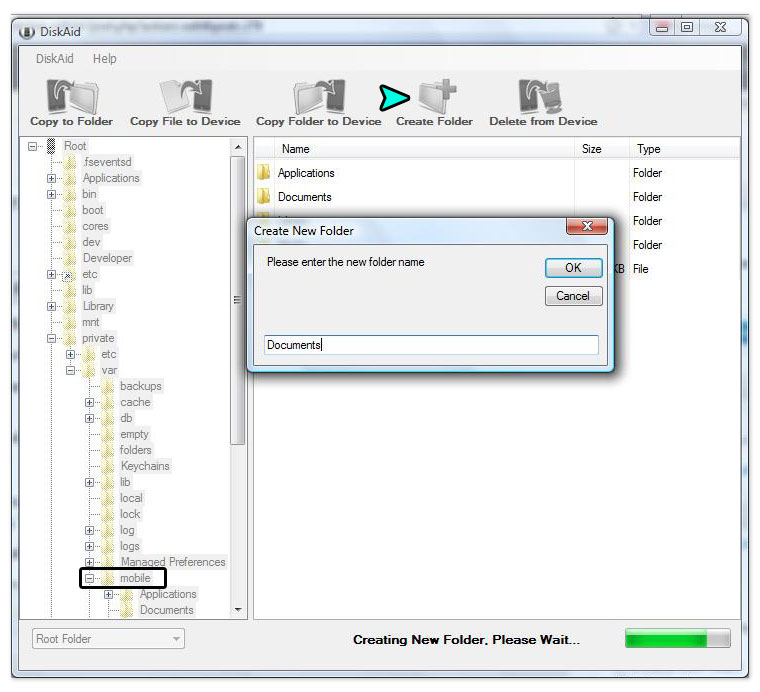
You will be using DiskAid though the rest of these steps, Now go to
/private/var/mobile/
folder and Create Folder button at the top, name it Documents Make sure to spell “Documents” correctly, with a capital “D”.
install-cracked-apps-games-ipa-on-iphone-ipod-5

Step 5

Now go to the root level and open the
/Applications
folder (will be at very top the Root level Dir). Inside the Applications Folder, do the same again Create Folder button and same thing, “Documents“.
install-cracked-apps-games-ipa-on-iphone-ipod-6

Step 6

Go back to the Root again , and Locate
/System/Library/PrivateFrameworks/MobileInstallation.framework
Right click on the file  “MobileInstallation”  rename to “MobileInstallation.bak”.
install-cracked-apps-games-ipa-on-iphone-ipod-7

Step 7

Then click “Copy File to Device” inside the same folder
/System/Library/PrivateFrameworks/MobileInstallation.framework
and locate the MobileInstallation Patch 2.2.1 that you should have downloaded early! Place that file in the folder!
install-cracked-apps-games-ipa-on-iphone-ipod-71
install-cracked-apps-games-ipa-on-iphone-ipod-651

Step 8

Click the Root level “/” to reload/refresh all the new things you have done and then close DiskAid, Restart your iPhone right Away!
Go find some cracked Apps/games(.ipa) for iPhone by yourself and just double click and Enjoy! (of course u must sync with iTunes but i would hope that is a no brainer!)
Don’t ask me for appz or games i do not support such things, unless its for myself ! :-)

Solutions to Errors (if any)

Very Rare cases but does happen!
A Few Errors I myself came across , some are not nice at all!
  • The application “App/game name” cannot be openedI would suggest at first, try to restart your iPhone and change USB Ports if that doesn’t work , Restore your iPhone from start via iTunes and redo all those lovely Quickpwn things again and than follow the instructions again ! and please try more than one cracked app/game just because one didn’t open doesn’t mean the next wont! Happened with me! :)
    Still doesn’t work, here is the not nice one! Find another PC with another iTunes installed. ( Uninstalling and reinstalling iTunes will not help this issue, unless you manual delete all of the iTunes data on your hard drive)
  • Error can not Sync App/game with iTunes
    okay you did something wrong retract your steps 1-8!
  • Error 0xE800001Change USB port and reboot your iPhone/iPod Touch. If this doesn’t work try going into: Control panel->System->Device Manager->Universal Series Bus Controller->Right click Apple Mobile Device USB Driver and update driver.
  • Error 0xE800013You get this error when you already have the app/game. Simply delete the .app folder that you have sync too!
That should be most of the Errors anything else please inform us and I or one of these great guys working on these forums will get back with you!

Related Posts Plugin for WordPress, Blogger...